
Homeschool progress tracker and gradebook for each child
Because every lesson is ticked off as it happens, Home Scholar can show you a clear picture of the year for each child: what was planned, what got done, what slipped, and how the grades are going.
Planned, completed and missed, for each child
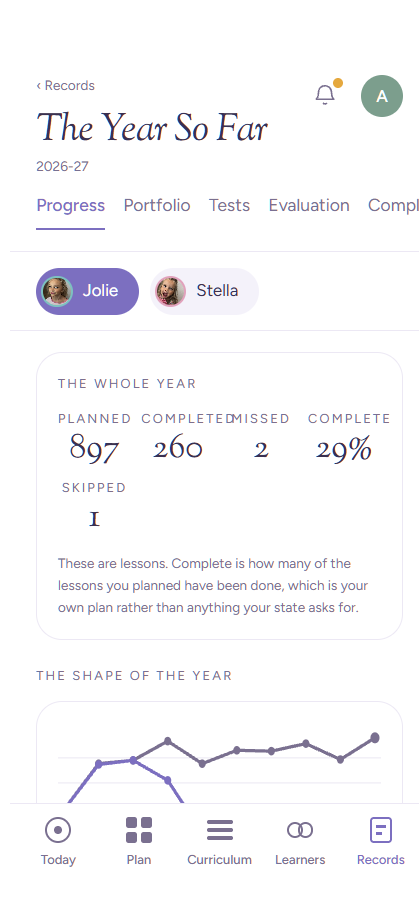
The Year So Far shows each child’s whole year in a few numbers: lessons planned, completed, missed and skipped, and how much of the plan is done.
It measures progress against your own plan, so you can see how the year is going and adjust early.
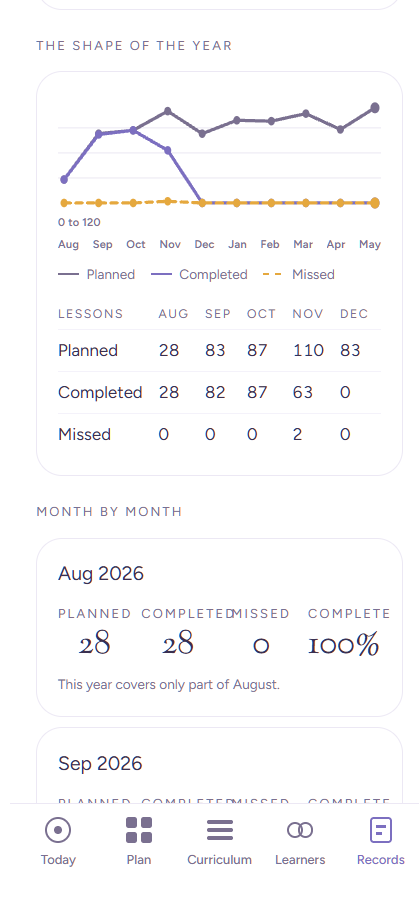
The shape of the year at a glance
A chart shows planned, completed and missed lessons for every month of the school year, with the numbers underneath. Each month also has its own card, so you can see that October was a full month and November is still running.
Grades kept by course, your way
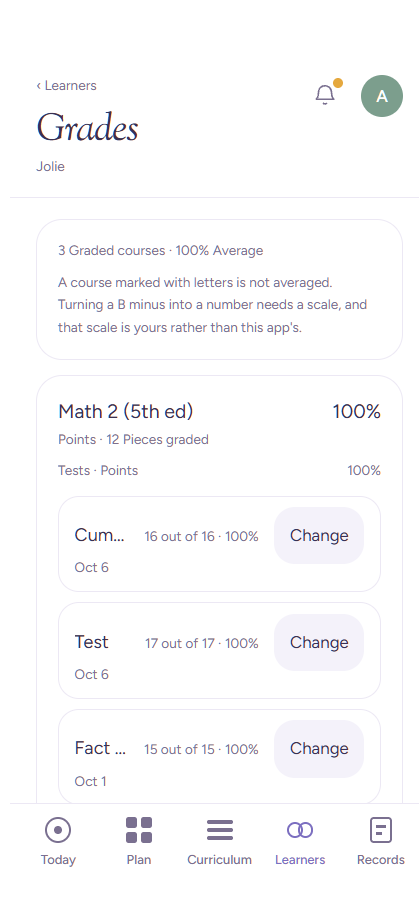
Grade the lessons you want to grade, in points or as a percentage, and each course keeps its own average. Every graded piece is listed with its date and score, and you can change one later.
Courses graded with letters aren’t averaged. Turning a B minus into a number needs a scale, and that scale is yours rather than the app’s. Standardized test results have their own place on the Tests tab, with the score report kept alongside.
Questions parents ask about progress
How do I track homeschool progress?
Tick lessons off as you teach them and Home Scholar keeps the count for you: planned, completed, missed and skipped, for each child and each month, measured against your own plan.
How do I know if a subject is falling behind?
Each child’s page shows every subject’s progress and marks the ones that are behind. It also points out a subject that has gone quiet for a while.
Do I have to give grades?
No. Grade only what you want to. Grades and test results are kept for you, and they’re left out of a packet when your state doesn’t use them.
Can I record standardized test scores?
Yes. Add a result on the Tests tab and keep the score report with it. A standardized test is one of the ways a year can be evaluated.
Try it with your own year
Add your kids and one course, and tomorrow has a plan. The 14-day free trial is the whole app, and no card is needed to start.
Start your 14-day free trialOr go back to everything Home Scholar does.