
Homeschool lesson planner with rescheduling and pacing tools
Most homeschool planners are hard to change once the week goes off plan. Then you’re crossing things out and rewriting the whole month by hand. In Home Scholar, the plan moves with your family. When a week goes sideways, you pick what should happen, and you see exactly what will move before anything moves.
Your whole week, every child, on one screen
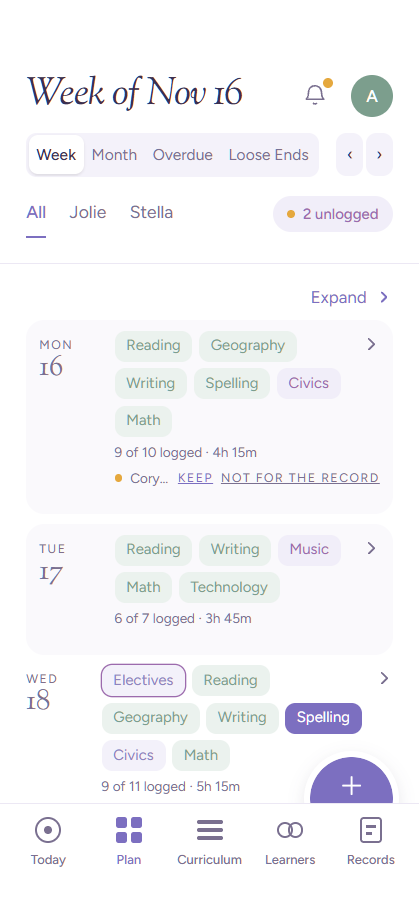
The Plan tab opens on this week. Each day shows the subjects on it for every child, how many lessons are logged so far, and how much time that was. Tap a child’s name to see just their week, or switch to the month when you want the bigger picture.
Overdue gathers anything that should have been done by now, so you can see what’s late. Your family calendar sits on the same days too, so ballet class and Saturday practice are right there beside the lessons.
Seven ways to move the plan, and none of them guess
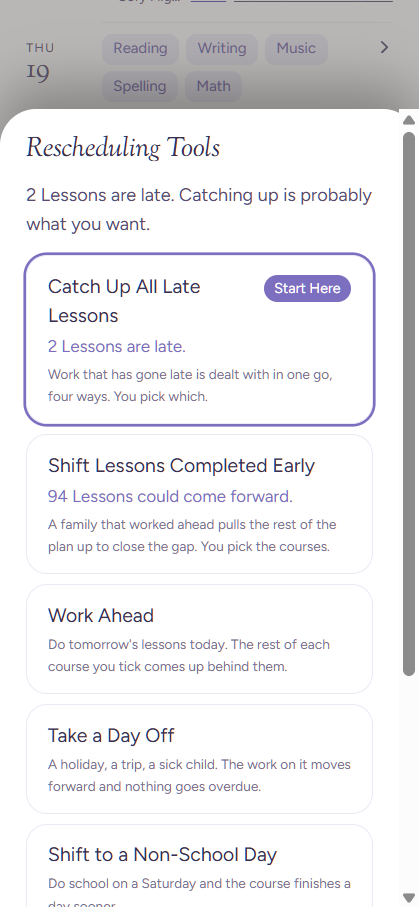
Under the week are the rescheduling tools, and the app tells you which one you probably need. If two lessons are late, it says so and puts catching up at the top.
You can take a day off for a holiday, a trip or a sick child, and that day’s work moves forward so nothing goes overdue. If you worked ahead, you can pull the rest of the plan up to close the gap. You can do tomorrow’s lessons today, do school on a Saturday so a course finishes a day sooner, or move one course by a few teaching days. Every day off this year is listed in one place, with a way to take it back.
You decide what happens to late lessons
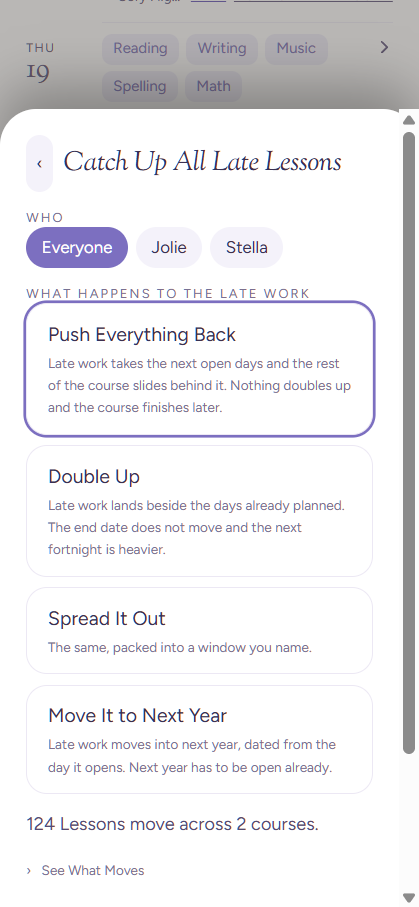
Catching up is never one size fits all, so there are four ways to do it. Push everything back, and the course simply finishes later. Double up, and the end date stays put but the next couple of weeks are heavier. Spread it out over dates you pick. Or move it to next year.
You can catch up for everyone or for just one child. Before you confirm, Home Scholar tells you how many lessons will move and across which courses, and it warns you if a course will no longer fit inside your school year. You can open the full list of what moves before you say yes.
Pace the whole year with one slider
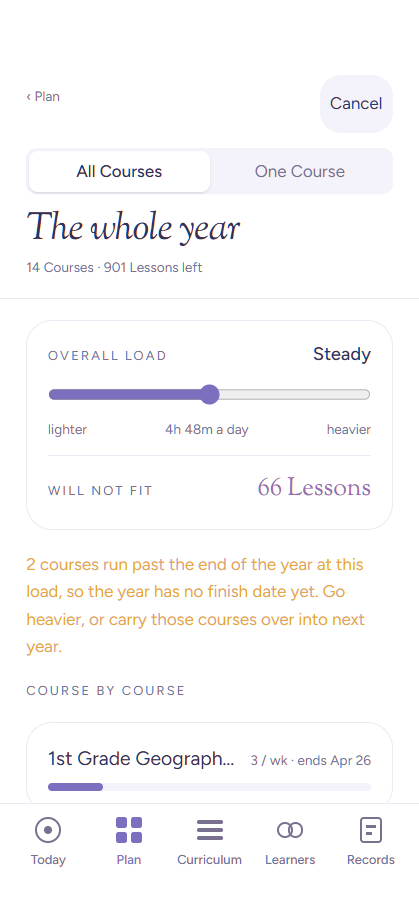
Slide the whole year lighter or heavier and watch what it means in real terms: how many hours a day it adds up to, how many lessons a week each course gets, and the date each one will finish. Courses you keep coming back to all year, like reading games or typing, run on a loop with no end date.
If something won’t fit before the end of your school year, it says so plainly and tells you your options: go a little heavier, or carry that course over into next year. Work you already taught stays exactly where it happened. Only the lessons still to come are moved. You can also pace one course at a time.
Questions parents ask about planning
How do I pace a homeschool curriculum?
Start with how many lessons are left and how many weeks you have to teach them. In Home Scholar you set lessons per week for each course and it shows you the date that course will finish. If the year as a whole is too heavy or too light, pace the whole year with one slider and watch every finish date move at once.
What happens to the plan if we miss a day?
Take a day off and that day’s work moves forward, so nothing goes overdue. If the day has already passed, the late lessons wait for you, and you choose how to catch up: push them back, double up, spread them over dates you pick, or move them to next year.
Can I plan for more than one child?
Yes. Each day shows every child’s subjects together, and you can tap one child to see only their week. When you catch up, you can do it for everyone or for one child.
Can we do school on a Saturday?
Yes. Shift a lesson to a non-school day and the course finishes a day sooner.
Do I have to use a particular curriculum?
No. Workbooks, online programs, a co-op class or a kit that arrives in a box can all become courses in your plan.
Try it with your own year
Add your kids and one course, and tomorrow has a plan. The 14-day free trial is the whole app, and no card is needed to start.
Start your 14-day free trialOr go back to everything Home Scholar does.