
Homeschool app for multiple children, chores and other caregivers
A homeschool runs on more than lessons. Home Scholar keeps every child, the chores and routines, the family calendar and every grown-up who helps in one place, each with exactly the access they need.
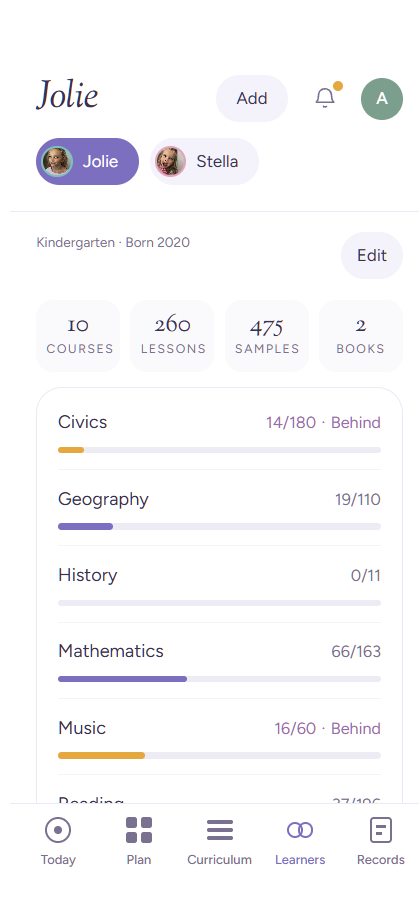
Every child has a page of their own
Each child’s page shows their courses, lessons, work samples and books, and the progress in every subject, with the ones that are behind marked clearly. If a subject goes quiet for a few weeks while the rest carry on, it says so.
Their grades, their work and their settings are all one tap away, and every record is kept under the right child from the start.
Chores and routines beside the lessons
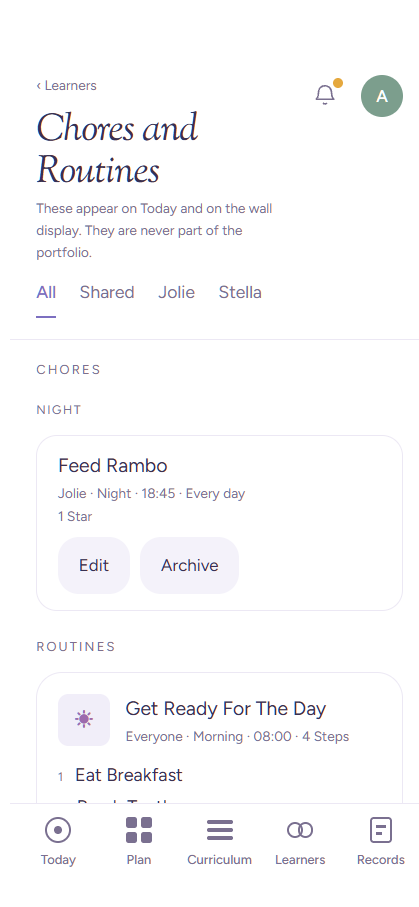
Add chores with a time and how often they come round, and give them stars if that helps at your house. Routines are ordered lists for a part of the day, like getting ready in the morning: eat breakfast, brush teeth, brush hair, get dressed.
They show on Today and on a wall display, for one child or shared by everyone, and they’re never part of the portfolio.
The right access for everyone who helps
Invite a co-parent, and they can do everything you can. Invite a helper, like a nanny, an au pair or a grandparent, and they can run the teaching day without ever seeing the records or the account. A co-op teacher sees the day and the work, and nothing legal. You can change what a helper or a teacher may do after they join.
Bring your calendars in, put Home Scholar on your phone’s calendar, and see every day off in one place. When a child uses the device, set a gate code so the grown-up side stays yours. You can even connect Home Scholar to an AI assistant like Claude or ChatGPT.
Questions parents ask about the household
Can I manage more than one child?
Yes. Every child has their own page, courses, log and portfolio, and Today and the Plan show everyone together or one child at a time.
Can my partner or a nanny use it?
Yes. Invite a co-parent with full access, or a helper who runs the teaching day without seeing the records or the account.
Can my kids use it themselves?
Yes. Hand the device over and they see a quiet screen of their own day. A gate code brings it back to you.
Does it work with our family calendar?
Yes. Bring your calendars in so appointments sit beside the lessons, and add Home Scholar to your phone’s calendar.
How are records organized by child?
Every lesson, photo and log entry belongs to a child, so each one’s portfolio, grades and progress are kept apart automatically.
Try it with your own year
Add your kids and one course, and tomorrow has a plan. The 14-day free trial is the whole app, and no card is needed to start.
Start your 14-day free trialOr go back to everything Home Scholar does.